In short
The prompt box has a LinkedIn tips menu. Each tip is a switch, and all six start ticked. A ticked tip is added to your brief as a concrete instruction, and an unticked one is not. They are advice, not rules: if your brief says something that conflicts with a tip, your brief wins.
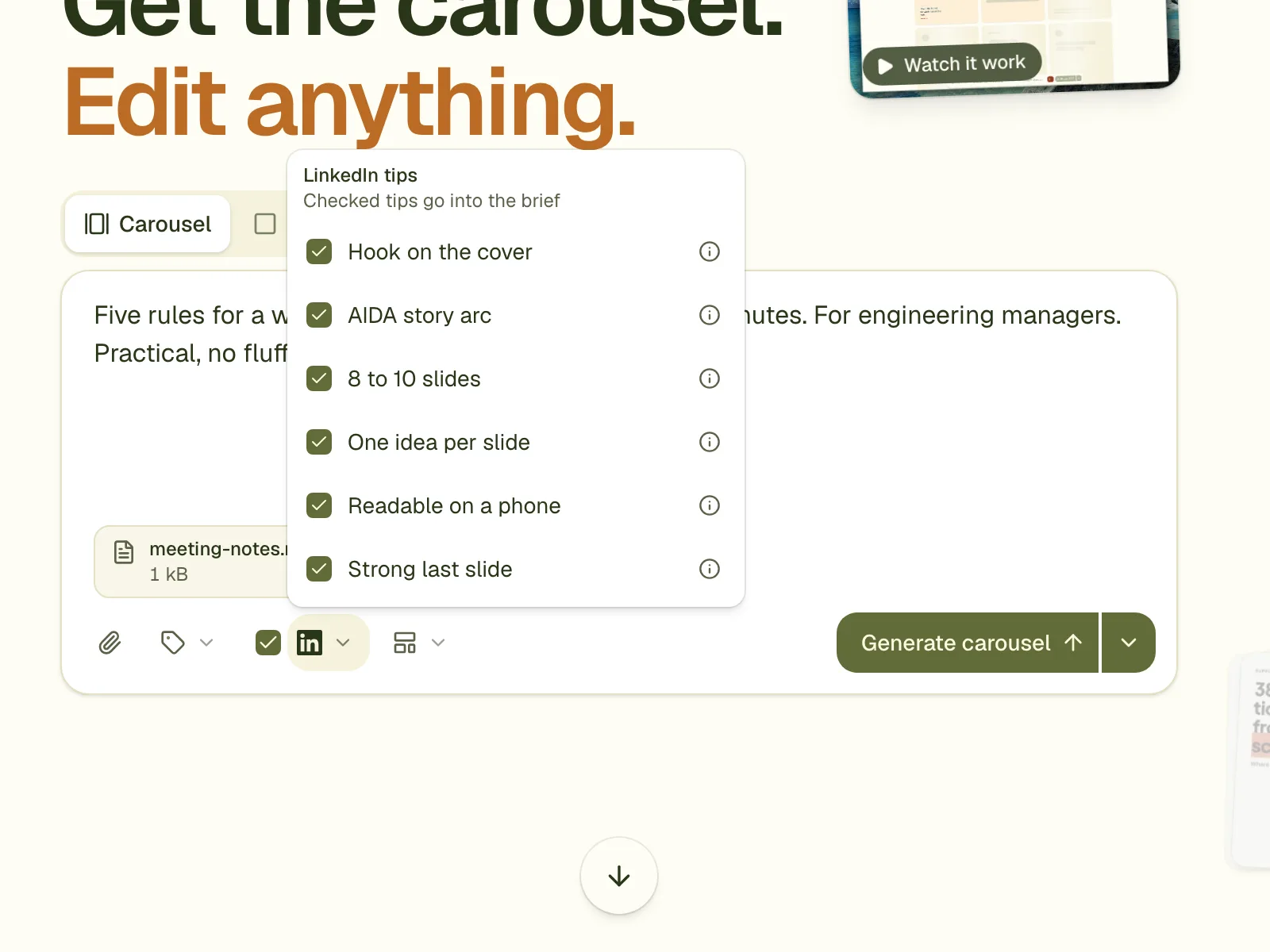
The six tips
| Tip | What the designer is told | Why |
|---|---|---|
| Hook on the cover | Slide 1 states one specific promise, result or surprising number in at most 10 words, and is the largest text in the carousel. | In the feed people see only the cover. LinkedIn's own guide says it is the first thing seen. |
| AIDA story arc | Attention, interest, desire, action, in an order that suits the material. | A classic copywriting order. No measured effect for carousels; it is practitioner advice. |
| 8 to 10 slides | Total length of 8 to 10 slides, cutting the weakest points instead of adding. | One benchmark of 8,400 B2B carousels found 9 to 12 slides at 5.4% engagement against 3.6% for 16 or more. Vendor data. |
| One idea per slide | A headline of at most 8 words and about 40 words per slide. | LinkedIn uses dwell time as a ranking signal, and short slides get read to the end. The 40-word limit is our opinion. |
| Readable on a phone | Body text at least 36 px, headlines at least 64 px, margins at least 80 px, contrast at least 4.5:1. | LinkedIn's guide warns against small fonts. The pixel sizes are our own arithmetic. |
| Strong last slide | Restate the takeaway, then one honest question or a reason to save. No "comment YES". | Documents get a larger share of saves than their share of posts, and LinkedIn shows engagement bait to fewer people. |
Which to tick
- Leave all six ticked for your first carousel. They are the usual advice.
- Untick the length tip when the material is a long checklist and you want more slides.
- Untick the phone tip only for a dense table that you want to show in full; it limits how small text can be.
What the evidence is, and is not
Only two tips have a number behind them, and both are from vendors' own data on their own users' posts. The others are LinkedIn's guidance or common practice. The menu says which is which: each tip links its source.
Questions
Are the tips on by default?
Yes, all six start ticked. Untick any you do not want, or use the checkbox at the top to switch them all off.
Do the tips guarantee more engagement?
No. They apply advice that has some evidence. What works for your audience you learn from your own posts.
What if I ask for 14 slides and the length tip is on?
The brief wins where the two conflict, but the tip is still in the instruction. If you want 14 slides, untick the length tip.
Try it on your own carousel
Make a carousel from a short brief, then use this feature on it. It takes about a minute to get the first draft.
Try for free nowNo sign-up needed to try. The free plan exports with a small carouselgen.com mark.