
In short
A comment on a headline changes that headline. Sometimes the problem is the whole carousel: the margins are too tight, the text is too small, the tone is too formal. A note on the whole carousel reaches every slide in one round.
Two ways to ask for a change everywhere
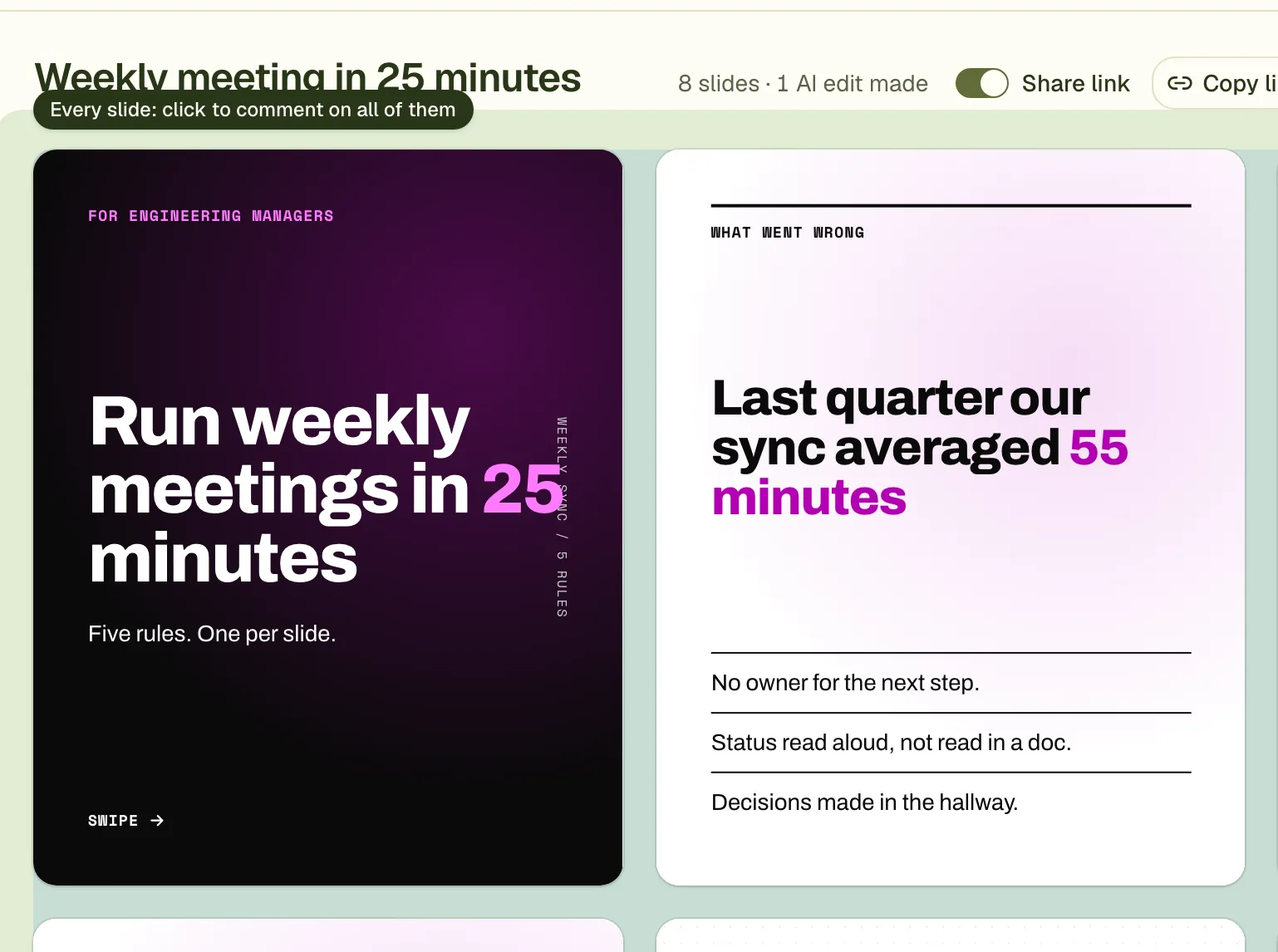
Pin the note to the space around the slides
Hover the gap around and between the slides. It lights up with the hint "Every slide: click to comment on all of them". Click there and write the note.
Or say so on any comment
Write "on every slide" or "on all slides" in a comment pinned to one element. The designer then applies it to every slide.
Press Apply changes
The note is sent with your other comments. Each slide is revised, and a slide that already meets the request is left as it is.
How to word a note for the whole carousel
- Name the result you want: "body text at least 36 pixels everywhere" works better than "text is small".
- Say what to keep: "keep the cover as it is".
- One request per note. "Bigger text" and "warmer colours" are two notes.
- For the look, mention colours and fonts by name: "headlines in Fraunces, accent colour #bc6c25".
The notes are sent together, so the designer works out which slides need changing and what the same fix looks like on each. Words are rewritten slide by slide. A look change that lives in the carousel's shared style, such as a font, can be made once for all slides.
When the note is not available
Notes on the whole carousel need a finished carousel with more than one slide. A single image post has nothing to spread a note over. As with any comment, the round uses one of your plan's edit rounds.
Questions
Does a note on the whole carousel cost more than a normal one?
No. It is part of one edit round, like any comment. Up to 10 notes and comments go in a round.
Will it change slides that were already fine?
It should not. Each slide is checked against the request, and a slide that already meets it returns no changes. Read the list of changes after Apply to confirm.
Can I change the font of the whole carousel?
Yes. Write the font name in a note on the whole carousel. Any family from Google Fonts works; a name Google does not have is ignored.
Try it on your own carousel
Make a carousel from a short brief, then use this feature on it. It takes about a minute to get the first draft.
Try for free nowNo sign-up needed to try. The free plan exports with a small carouselgen.com mark.